If you’ve ever checked someone’s profile and immediately wondered whether they saw your name pop up, you’re not alone. One of the most searched questions on the platform is how to turn off profile views on LinkedIn, and for good reason. Professionals research competitors, recruiters, and companies every day. Not all of that needs to be public. LinkedIn private mode is a built-in feature that lets you browse quietly. It’s simple, powerful, and often overlooked. Below, you’ll learn exactly what it does, how it works, and when using it makes sense.
What LinkedIn private mode actually does
LinkedIn private mode is a visibility setting that hides your identity when you view other profiles. Once it’s turned on, the person whose profile you visited won’t see your name, photo, or headline in their “Who viewed your profile” section. Instead, they’ll see vague labels like “Anonymous LinkedIn Member,” “Someone on LinkedIn,” or a generic industry description. In short, you become invisible while browsing. This is very different from how LinkedIn works by default. Normally, when you visit a profile, your full name, profile picture, and headline are shown. That transparency encourages networking, but it isn’t always what you want.
Why professionals want to turn off profile views on LinkedIn
There are plenty of valid reasons to use private mode, and none of them involve doing anything wrong. One common reason is quiet job research. You might be preparing for an interview or thinking about a career change without wanting your current employer to notice your activity. Private mode lets you look up recruiters, hiring managers, and team members without raising questions.
Another reason is competitive research. Sales, marketing, and recruitment professionals often analyze competitor profiles. Staying anonymous helps you gather information without revealing your company or strategy. Some people simply value privacy. They don’t want every profile click to be visible, especially when comparing candidates, reviewing alumni, or revisiting the same profile multiple times. Private mode also helps avoid awkward situations. Repeated profile views can easily be misinterpreted. Turning off profile views on LinkedIn removes that friction completely.
How to turn off profile views on LinkedIn step by step
If you’re wondering how to turn off profile views on LinkedIn, the process is quick and doesn’t require any special tools. Everything is built into your account settings. Here’s how to make LinkedIn private:
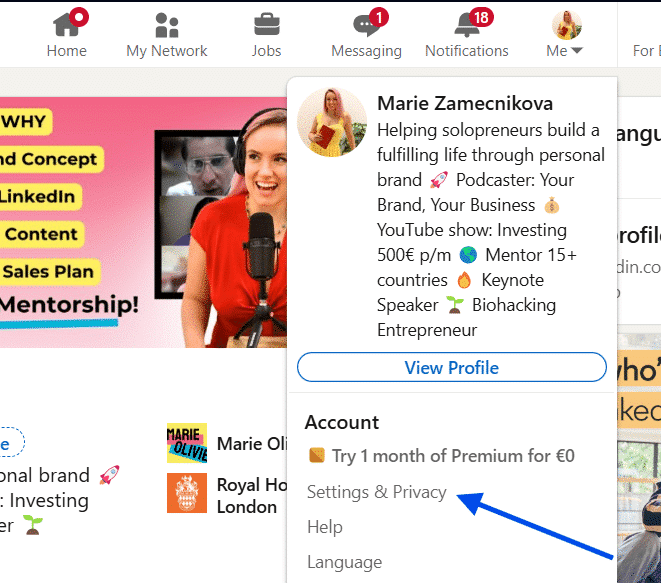
Click your profile picture in the top-right corner and select Settings & Privacy.
Go to Visibility in the left-hand menu and click Profile viewing options.
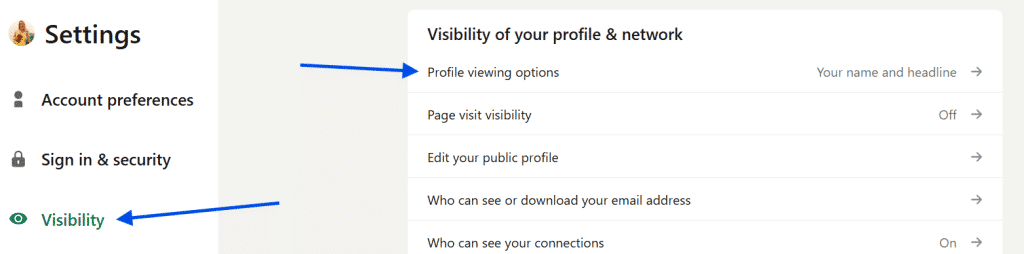
Choose Private mode. The change takes effect immediately. From that moment on, your profile visits are anonymous.
The important trade-off most users miss
There’s one limitation that surprises many people. When you use LinkedIn private mode, you lose access to your own profile viewer list. That means you have to choose between two options:
- Seeing who viewed your profile
- Staying hidden while viewing others
You can’t do both at the same time. If tracking profile views is part of your networking strategy, it’s best to switch private mode on only when you really need it, then turn it off again.
Common mistakes when using LinkedIn private mode
Even though the feature is simple, users often make a few avoidable mistakes. The first is forgetting private mode is on. People browse anonymously for a while, then later wonder why they can’t see who viewed their own profile. Another mistake is using private mode during active networking. If you’re trying to connect with founders, reach out to prospects, or grow visibility, hiding works against you. People won’t know you showed interest. Some users also assume private mode works retroactively. It doesn’t. If you viewed a profile publicly earlier, switching to private mode won’t erase that visit.
When you should not turn off profile views on LinkedIn
There are situations where visibility is actually an advantage. If you’re applying for jobs and want recruiters to notice you, staying public helps. The same applies when you’re building a personal brand, networking with alumni, or trying to grow your presence in an industry. In these cases, profile views act as a signal. Turning them off removes that signal entirely.
Is LinkedIn private mode worth using?
Yes, when used intentionally. LinkedIn private mode gives you control over your visibility and lets you research freely without exposing your identity. It’s especially useful during job searches, competitive analysis, and quiet planning. The key is balance. Use private mode when you want discretion. Turn it off when visibility supports your goals. Knowing how to turn off profile views on LinkedIn, and when to do it, gives you a small but powerful edge on the platform.