LinkedIn is built around visibility. Every profile view, headline, and job title is designed to help professionals discover each other. But what if you don’t want to be seen every time you click on someone’s profile? That’s where learning how to make LinkedIn profile private becomes essential.
Whether you’re quietly job hunting, researching competitors, or just browsing out of curiosity, LinkedIn private mode gives you control over what others can see. Many users don’t even know this feature exists, yet it can completely change how you use the platform. Below, you’ll learn exactly how it works, why it matters, and when you should or should not use it.
What LinkedIn private mode actually does
LinkedIn private mode is a viewing setting that hides your identity when you visit someone else’s profile. Once enabled, your name, photo, and headline disappear from their “Who viewed your profile” section. Instead of seeing your details, the other person will see vague labels like “Anonymous LinkedIn Member,” “Someone on LinkedIn,” or a generic industry description. In simple terms, you become invisible while browsing. This is very different from LinkedIn’s default behavior. Normally, when you view a profile, the platform shows your full name, profile picture, headline, and sometimes your employer or location. That transparency helps with networking, but it’s not always ideal.
Why professionals choose to go private on LinkedIn
There’s a common myth that private mode is only for sneaky behavior. In reality, many professionals use it for practical reasons.One major reason is quiet job research. If you’re preparing for interviews or thinking about a career move, you may want to look up recruiters or hiring managers without alerting your current employer.
Private mode is also useful for competitive research. Salespeople, marketers, and recruiters often study competitor profiles. Staying anonymous helps avoid signaling intent or strategy. Some users simply value privacy. They prefer to browse without leaving a digital trail. Others want to avoid awkward situations, like viewing the same profile multiple times while comparing candidates or clients.
How to make LinkedIn profile private step by step
If you’re wondering how to make LinkedIn profile private, the process is straightforward. The challenge is knowing where LinkedIn hides the setting.
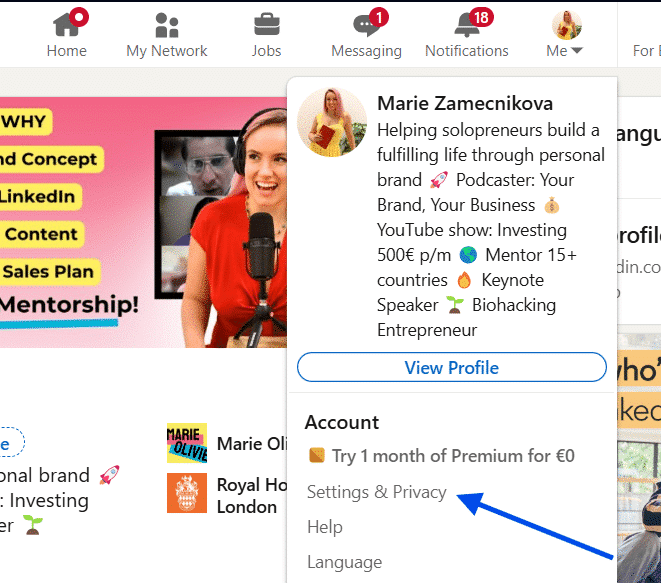
Start by clicking your profile picture in the top right corner. From there, select “Settings & Privacy.”
In the menu on the left, click “Visibility,” then choose “Profile viewing options.”
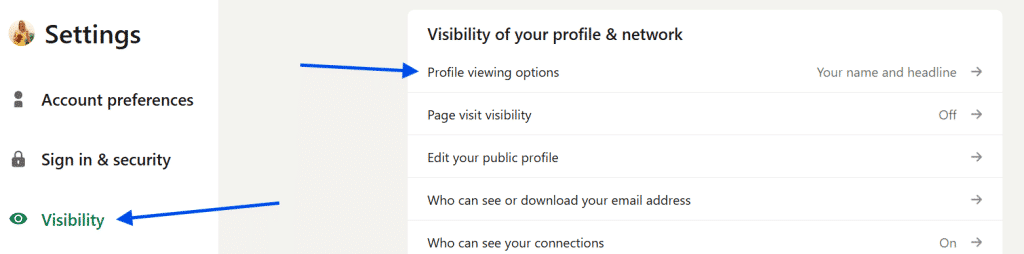
Finally, select “Private mode.” Once you do this, your profile views instantly become anonymous. There’s no confirmation screen or delay. The change happens immediately.
The major limitation most users miss
Here’s the trade-off that surprises many people. When you turn on LinkedIn private mode, you lose access to your own viewer history. That means you can either see who viewed your profile or browse other profiles anonymously, but not both at the same time. If tracking profile views is part of your networking strategy, this limitation matters. A smart approach is to switch private mode on only when you need it, then turn it off when visibility becomes more important again.
Common mistakes with LinkedIn private mode
One frequent mistake is forgetting to turn private mode off. Users browse anonymously for hours or days, then later wonder why their “Who viewed your profile” section is empty. Another mistake is using private mode during active networking. If you’re trying to build relationships, pitch services, or attract attention from recruiters, hiding your identity works against you. Some people also assume private mode works retroactively. It does not. If you viewed a profile publicly before enabling it, that visit remains visible.
When staying visible works better than hiding
There are situations where private mode is simply the wrong choice. If you’re actively applying for jobs, recruiters noticing your profile views can actually help. The same applies when growing your professional presence or building a personal brand. Networking with alumni, founders, or industry peers also benefits from visibility. Seeing your name can prompt profile views, connection requests, and conversations that wouldn’t happen otherwise.
Is LinkedIn private mode worth using?
Yes, when used intentionally. LinkedIn private mode is a powerful feature that gives you more control over your browsing behavior. It allows you to research freely, protect your privacy, and avoid unwanted attention. The key is balance. Use private mode when you need discretion. Turn it off when visibility supports your goals. Knowing how to make LinkedIn profile private isn’t about hiding forever. It’s about choosing when to be seen and when to stay anonymous.