If you’ve ever wondered, can you see other people’s connections on LinkedIn, the short answer is yes, to a point. The longer answer is more interesting, because LinkedIn gives you more visibility and search power than most people realize. You just need to know where to click and how to filter.
This matters if you’re job hunting, recruiting, or trying to grow a useful network instead of collecting random connections. With the right approach, you can search through someone else’s network and uncover people you’d never find with a basic search. Here’s how it works, using only features LinkedIn already provides.
How seeing other people’s connections works
LinkedIn organizes relationships into degrees. Your direct contacts are your 1st connections. The people connected to them are your 2nd connections. One layer beyond that are your 3rd connections. When you search properly, you’re not limited to your own contacts. You can search across your 1st, 2nd, and 3rd connections. You can also explore the visible connections of someone you’re already connected to. There is a limit, though. Even if someone has hundreds of thousands of followers, you can only browse up to 30,000 of their 1st-degree connections. Still, that’s more than enough to be powerful.
How to view someone’s connections step by step
To see another person’s connections, you must be directly connected to them. Once that’s true, the process is simple:
Go to the profile of the person whose network you want to explore. On their profile, you’ll see a hyperlink that says something like “500+ connections.” Click that link.
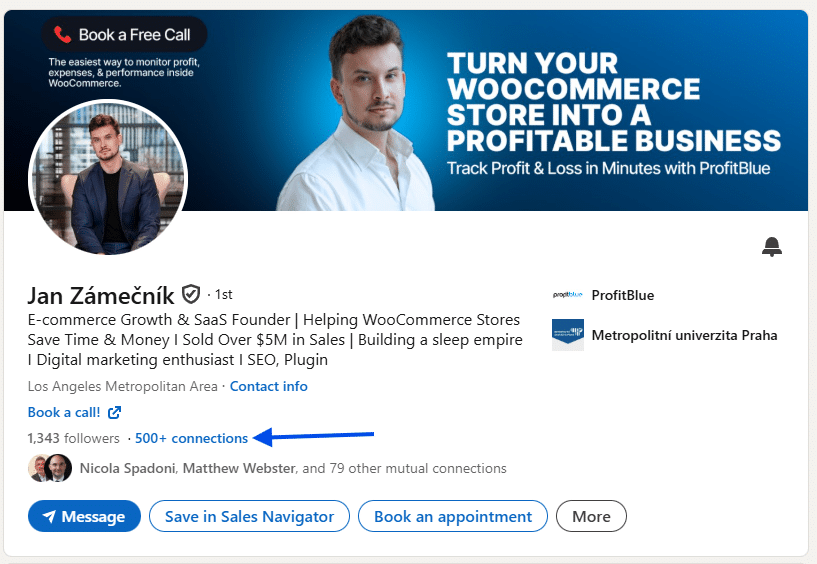
LinkedIn will then show you a list of people from that person’s network who are relevant to you, typically 1st and 2nd-degree connections. From here, the real value comes from filtering.
Why this answers the question “can you see other people’s connections on LinkedIn”
So, can you see other people’s connections on LinkedIn? Yes, if you are connected to them and know where to look. You can’t browse every follower or dig into private networks, but you can see and search a meaningful portion of someone’s connections.
More importantly, you can use those connections strategically. The more targeted your own network is, the more useful your searches become. A well-built network gives you better access to people who can help, advise, or open doors.
How to approach people once you find them
Finding the right people is only half the job. How you contact them matters just as much. Be polite, genuine, and clear. Avoid sounding aggressive or desperate. A short message that explains who you are and what you’re looking for works best. If someone responds, you can slowly build the conversation. You might ask a follow-up question, suggest a quick call, or even propose meeting for coffee or lunch. In-person networking, when possible, is especially effective.
Most LinkedIn users never go beyond basic searches. They ask, can you see other people’s connections on LinkedIn, assume the answer is no, and stop there. In reality, LinkedIn gives you strong tools to explore networks, filter results, and connect with the right people. Once you start using these features, the platform feels very different.
Play around with the filters, test different searches, and be intentional about who you connect with. The more focused your network becomes, the easier it is to find people who actually matter to your goals.