With over a billion professionals using LinkedIn worldwide, businesses that ignore this platform are missing a huge opportunity. If you’ve ever wondered how to create a business LinkedIn page and use it to attract clients, partners, or future employees, the process is simpler than you might think. More importantly, a well-built company page can quietly work for your brand every day without relying on paid ads. Below is a practical breakdown of why a LinkedIn company page matters, how to set one up, and how to grow it effectively once it’s live.
Why every business should have a LinkedIn company page
A LinkedIn company page is no longer optional for brands that want visibility in professional spaces. Unlike other platforms, LinkedIn is built specifically for networking, industry discussion, and business growth. A company page allows you to share updates, post articles, highlight services, and show what your business stands for.
It also gives your brand credibility. When people search for your company on LinkedIn, a complete page makes your business feel established and trustworthy instead of invisible or outdated.
How LinkedIn company pages boost brand visibility
LinkedIn company pages function as central hubs for your brand’s content. When you post updates, job listings, or insights, followers can like, comment, or share them. Each interaction pushes your content into the feeds of their connections, expanding your reach organically. This means your brand can gain exposure without spending money on advertising. Over time, consistent posting helps your company stay visible in relevant professional circles and reinforces brand awareness.
Company page vs personal profile: Why it matters
While personal profiles are useful, they’re not designed to represent an entire business. A company page separates your personal identity from your brand identity. It gives you space to highlight your mission, values, products, and services in one place. This distinction matters, especially as your business grows. A dedicated page makes it easier for people to follow your company without needing to connect with an individual employee.
Step-by-step guide: How to create a business LinkedIn page
Creating a company page on LinkedIn doesn’t take long if you know what to expect.
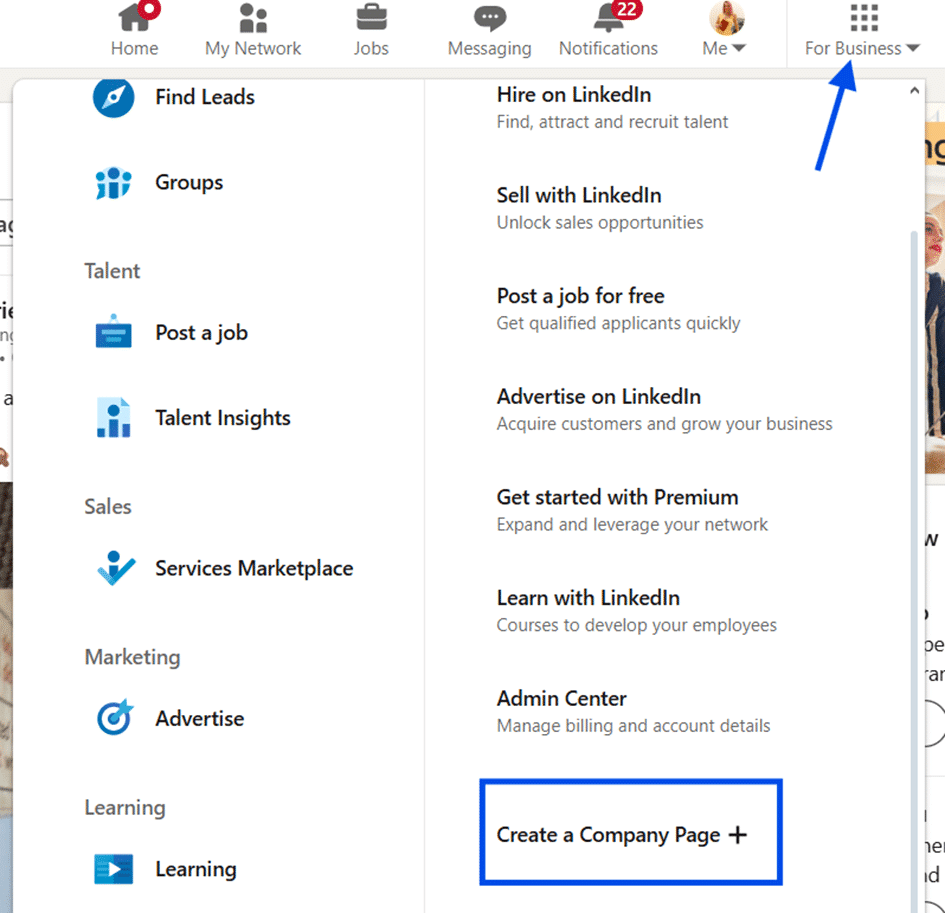
First, log in to your LinkedIn account. In the top right corner of the homepage, click the “For Business” icon. Scroll down and select “Create a Company Page.”
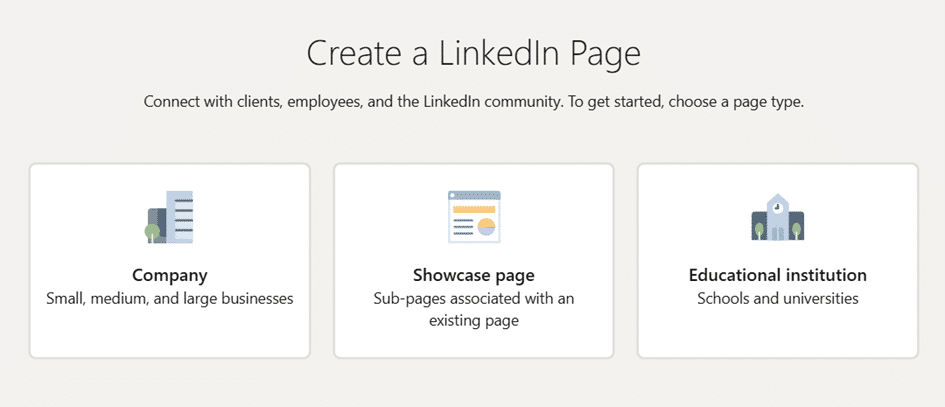
Next, choose the page type. LinkedIn offers options for small, medium, and large businesses, educational institutions, and showcase pages. Only select a showcase page if you already have an active company page.
After that, fill in your company details. This includes your company name, public LinkedIn URL, website, industry, company size, and business type. You’ll also upload your logo at this stage, which helps your page look professional from the start.
Then write your tagline. You have up to 120 characters, so keep it clear and engaging. This short line should explain what your business does and encourage people to learn more.
Finally, complete your company profile. Add as much information as possible. LinkedIn favors complete profiles, and fully filled-out pages are more likely to appear in search results.
How to grow and promote your LinkedIn company page
Once your page is live, growth becomes the focus. A company page only delivers value if people actually see and engage with it.
How to get followers organically
Organic growth takes patience, but it builds a more loyal audience. Post regularly and focus on quality content that’s useful or interesting to your audience. Consistency matters more than volume. Using relevant hashtags helps your posts appear in search results, making them visible to users beyond your existing followers. You should also add the LinkedIn icon to your website and email signature so customers and partners can easily find your page.
Learning how to create a business LinkedIn page is a smart move for any company that wants long-term visibility in professional spaces. With the right setup and consistent effort, your page can become a valuable asset that supports brand awareness, engagement, and growth without relying entirely on paid promotion.