Creating a professional presence on LinkedIn is no longer optional—it’s a strategic move that can elevate your credibility, visibility, and connections in the business world. If you’re wondering how to create a LinkedIn business page or how to make a LinkedIn page for a company, this guide walks you through everything.
Why should you consider creating a LinkedIn business page?
A LinkedIn Business Page allows you to showcase your brand to a global professional audience. It boosts credibility, increases brand visibility, and connects you with people actively searching for expertise, insights, and services. Whether you’re building partnerships, hiring talent, or sharing industry knowledge, a Business Page gives your company a powerful presence on the world’s largest professional platform.
What you gain from building a LinkedIn business page
Enhanced networking possibilities
A Business Page helps you reach professionals who may be looking for collaborations, suppliers, or industry partners. With the right strategy, your brand becomes discoverable to the right people at the right time.
Stronger brand promotion
LinkedIn allows you to promote your services, share updates, and tell your company’s story in a compelling way. Thoughtful posts help position your brand as an authority.
Talent attraction and hiring
Many professionals browse LinkedIn for job opportunities. A polished Business Page helps attract qualified candidates who resonate with your mission and values.
Analytics to improve your strategy
Your page includes built-in analytics that track follower demographics, engagement trends, and the performance of your posts—giving you valuable insights for growth.
How to start creating a LinkedIn business page
If you’re ready to begin, the process is simple:
- Log into your LinkedIn account.
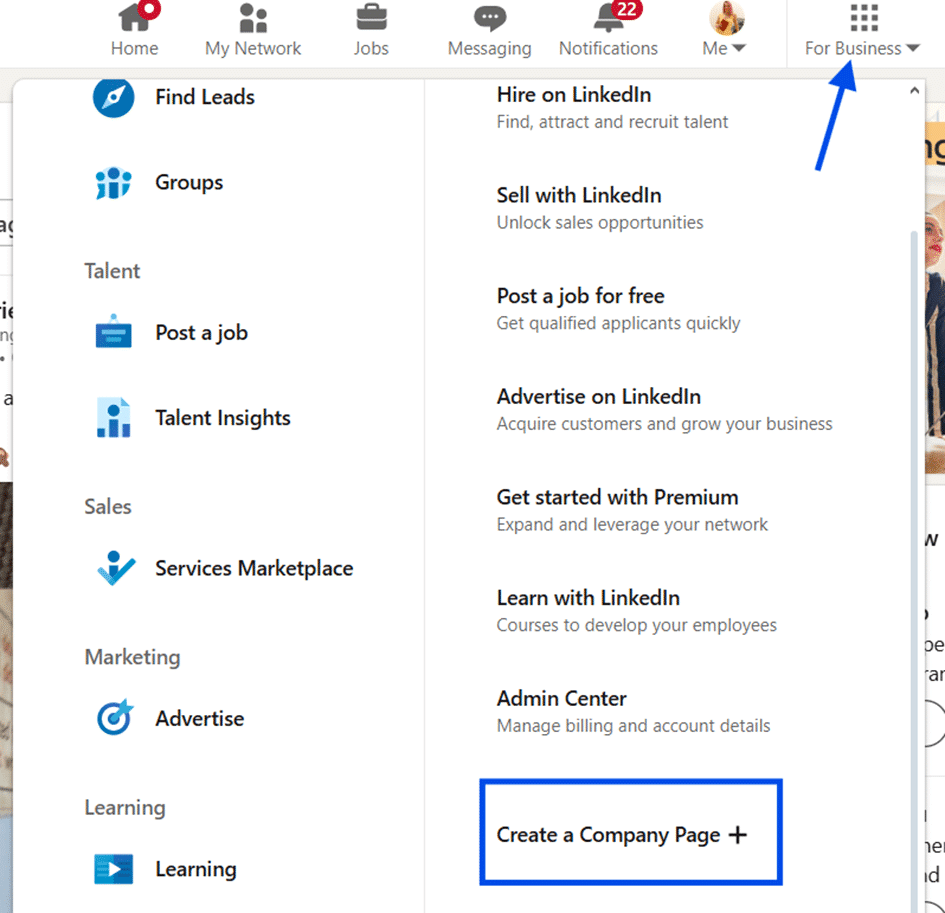
- In the top right corner of your LinkedIn homepage, click on the “For Business” icon.
- Then scroll down to select “Create a Company Page.”
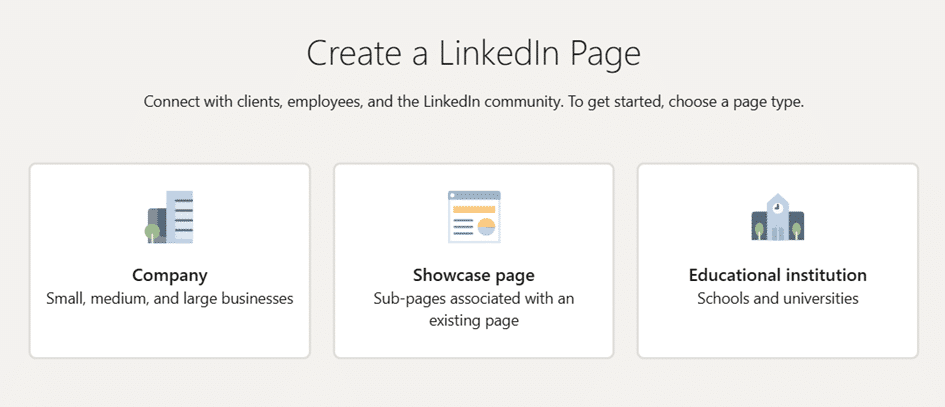
- Choose the correct category (small business, medium to large business, etc.).
- Follow the prompts and complete the required fields.
Before starting, make sure you gather essential elements including your business name, a logo (recommended 300 × 300 pixels), a cover image, a website URL, and a compelling description of your company.
How to optimize your LinkedIn business page for better visibility
A complete, visually appealing, and keyword-rich page performs best. To increase visibility:
- Use a clean, professional logo and cover image
- Include keywords or industry-specific terms
- Post regularly and consistently
- Add engaging visuals like videos or infographics
- Share company news, insights, and valuable resources
Consistency signals credibility, helping you appear more often in searches and feeds.
What to post on your LinkedIn business page
Your content should add value. Consider sharing:
- Industry insights and trends
- Company milestones or announcements
- Behind-the-scenes updates
- Employee spotlights
- Case studies
- Educational videos and infographics
The more informative and engaging your content, the more your audience will interact with your page.
How to promote your LinkedIn business page effectively
Promotion helps your page reach the right audience faster. You can:
Encourage employee advocacy
Ask employees to share your posts and contribute their own insights. Their networks help increase reach.
Use LinkedIn ads
Paid promotion helps target specific industries, job titles, or demographics.
Cross-promote
Share your page link on other social networks, websites, and email newsletters.
How to measure your LinkedIn business page’s success
LinkedIn’s built-in analytics let you track:
- Follower growth
- Engagement on posts
- Audience demographics
These insights help you refine your content strategy and identify what resonates most with your audience.