Managing your professional network sounds simple, but anyone who uses LinkedIn regularly knows it can get messy fast. Over time, you connect with people from past jobs, events, quick introductions, or moments that no longer make sense today. That’s when a quiet but common question shows up: how do I delete a LinkedIn contact without making things awkward?
The good news is that LinkedIn is built for this exact situation. The platform gives you clear tools to remove a connection without notifications, explanations, or uncomfortable follow-ups. If you’ve been hesitating because you didn’t know how it works, this guide breaks it down using only LinkedIn’s built-in options.
Why people choose to remove a connection on LinkedIn
LinkedIn isn’t just another social feed. It’s a professional space where your connections shape what you see, what others see, and how relevant your network feels. Over time, not every connection stays useful. Someone may switch industries, stop being active, or simply no longer align with your goals. Many users clean up their connections from time to time. Others only do it when something feels off. Either approach is normal. Knowing how do I delete a LinkedIn contact helps you stay in control of your network without overthinking it.
How do I delete a LinkedIn contact from a profile page
One of the fastest ways to remove a connection is directly from that person’s profile. This method works well when you already know exactly who you want to remove. Start by navigating to the profile of the person you want to disconnect from. At the top of their profile, in the introduction section, you’ll see a button labeled More. Click it to open a menu with extra actions.
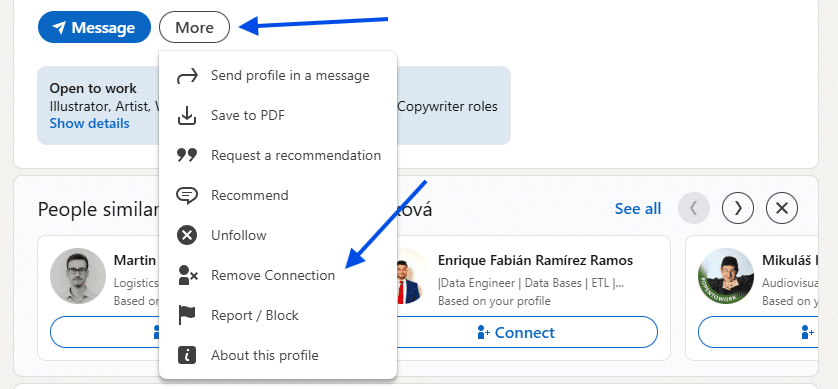
From that menu, select Remove Connection. As soon as you do this, the connection is removed. The status changes immediately to Connection Removed. There are no additional forms, no messages to send, and no explanations required. This option is quick and direct. If you’re reviewing profiles one by one, it’s often the easiest solution.
Removing a connection from your connections page
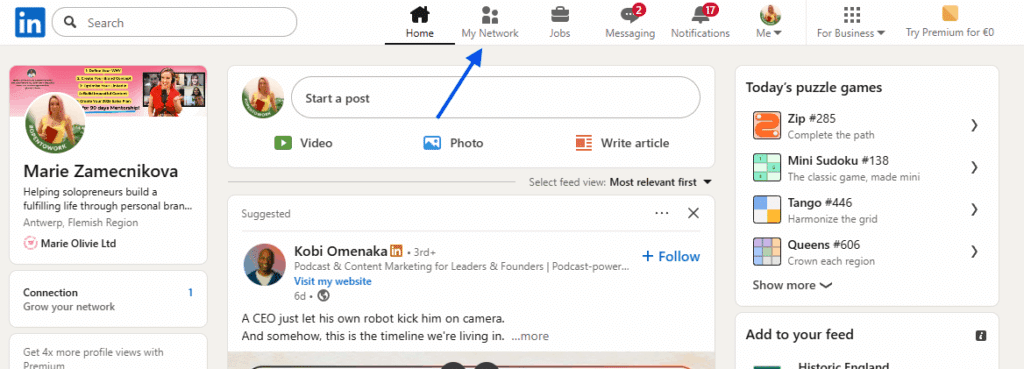
If you prefer to manage everything in one place, LinkedIn also lets you remove contacts from your full list of connections. This method is helpful when you want to review several connections at once. Begin by clicking the My Network icon at the top of your LinkedIn homepage. Under your profile name, you’ll see a link that shows your total number of connections, such as “465 connections.” Click that link to open your Connections page.
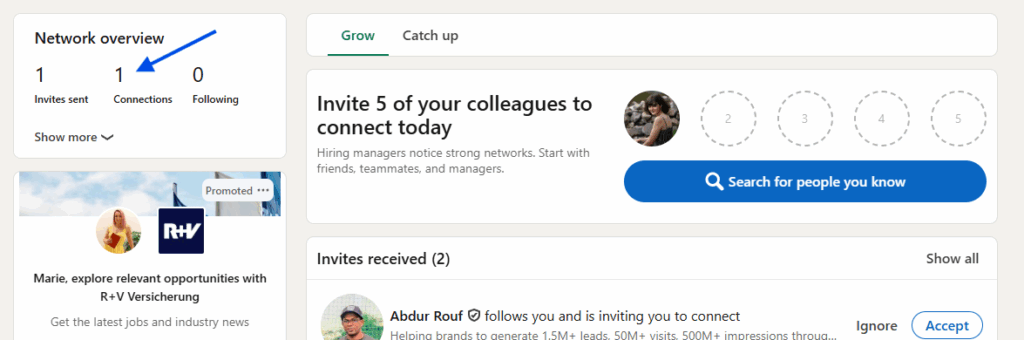
Once you’re there, scroll or search for the person you want to remove. Next to their name, click the More icon. A menu will appear. Select Remove connection.
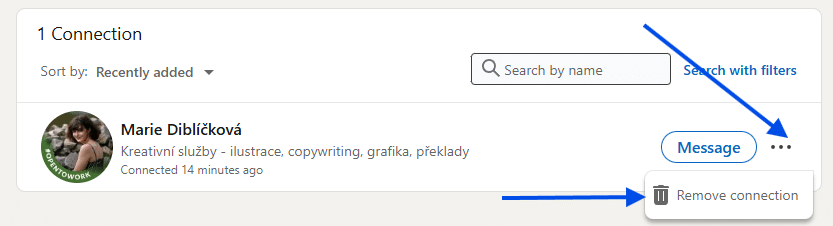
A pop-up window titled Remove Connection will then appear. Click Remove to confirm. After this step, the person is no longer part of your network.
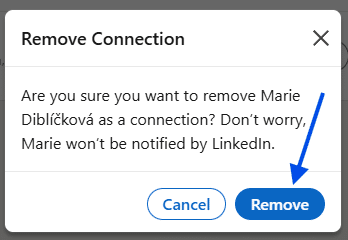
If you’ve been asking yourself how do I delete a LinkedIn contact while looking at your full list, this is the method you’ll use most often.
Which method works best?
Both options lead to the same result. The difference is convenience. Removing someone from their profile page is faster if you’re already there. Using the Connections page gives you more control if you’re reviewing your network as a whole. The steps don’t change, and there’s no mention of limits on how many connections you can remove. You can repeat the process whenever you need to, without extra rules or restrictions.
What happens after you remove a connection
Once a connection is removed, LinkedIn simply updates their status to Connection Removed. That’s the only confirmation you’ll see. There’s no requirement to message the person, explain your decision, or take further action. Everything happens quietly through LinkedIn’s existing tools. This design helps users manage their networks without turning it into a personal issue.
If you’ve ever wondered how do I delete a LinkedIn contact, the answer is much simpler than most people expect. Whether you remove someone from their profile or from your Connections page, LinkedIn keeps the process clear and low-key. Keeping your network aligned with your professional goals makes your LinkedIn experience cleaner, more relevant, and easier to manage. Now that you know exactly how to do it, you can make those changes whenever you feel it’s time.