Do you dream of a beautiful, polished, and professional LinkedIn profile? You’re not alone. Many people put a lot of effort into their experience, headline, and photo, but forget one small detail that makes a surprisingly big difference: the LinkedIn URL.
If you’ve ever looked at your profile link and seen a long mix of numbers and random characters, don’t worry. Learning how to obtain LinkedIn URL customization is one of the easiest upgrades you can make. It takes just a few minutes and instantly makes your profile cleaner, easier to remember, and more professional. Let’s walk through why this matters and how to obtain LinkedIn URL step by step.
Why you should customise your LinkedIn URL
Customising your LinkedIn URL is not just about aesthetics. It plays an important role in how others perceive you online. First, it looks far more professional. A clean URL such as “linkedin.com/in/johndoe” creates a polished impression, especially when you include it on your CV, cover letter, business card, or email signature. Compared to a default link full of numbers and letters, the difference is obvious.
Second, a customised LinkedIn URL is easier to remember. If you ever share your profile verbally, during a meeting or presentation, a short and simple link is much easier for people to recall and type correctly.
There’s also a search benefit. A customised URL can help with search engine optimization. When someone searches for your name on Google or LinkedIn, a clean and relevant URL can improve your visibility and increase the chances of your profile appearing higher in search results.
Finally, it strengthens your personal branding. Your LinkedIn profile represents your professional identity. A thoughtful URL reinforces that image and shows attention to detail.
How to obtain LinkedIn URL and edit it correctly
If you’re wondering how to obtain LinkedIn URL editing access, the good news is that the process is very straightforward.
Start by going to your LinkedIn profile. Click on your profile picture or your name, and you’ll be taken to your profile page. At the top of your browser, you’ll see your current LinkedIn URL. By default, it may look something like “linkedin.com/in/johndoe12345.”
To edit it, go to the “Public profile & URL” section. There, you’ll see a small pencil icon.
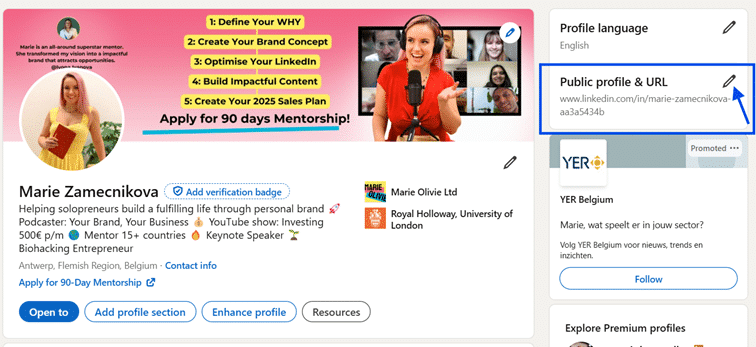
Click on it, and you’ll enter the editing section. You can then type your desired URL into the designated space.
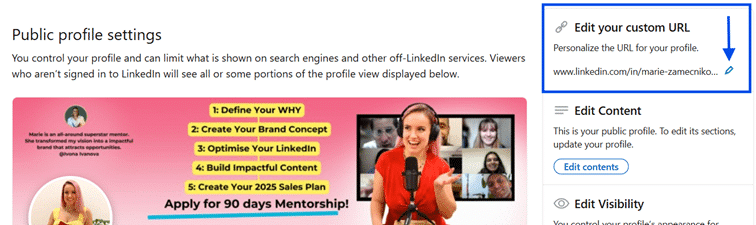
Keep in mind that your URL must be original. If someone else is already using the name you want, LinkedIn won’t allow it, so you may need to try a slightly different version. Once saved, your new LinkedIn URL will immediately reflect the format you selected.
Where to find your LinkedIn URL at any time
Knowing how to obtain LinkedIn URL page access also means knowing where to find it later. The easiest way is directly from your profile page. The link shown in your browser bar is your LinkedIn URL. After customisation, it will display your chosen format.
You can also always find it again in the “Public profile & URL” section, where you originally edited it. This is helpful if you want to copy it for your CV, email signature, or online portfolio.
Tips for choosing the best professional LinkedIn URL
Changing your LinkedIn URL is easy. Choosing the right one takes a bit more thought. Here are a few practical tips to help you get it right. Keep it simple. Shorter URLs are better. Ideally, use your name or professional brand without unnecessary words or characters. This makes your profile look clean and trustworthy.
Avoid numbers and special characters whenever possible. Numbers can make a profile look less professional unless they’re absolutely necessary to distinguish you from someone else. Reflect your personal brand. If you use LinkedIn mainly for business, you can include a keyword related to your profession, such as “john-smith-design” or “jane-doe-consulting.” This immediately tells people what you do and can make them more likely to click.
Make it consistent. Using the same naming style across your social media profiles creates a cohesive online presence. It also makes it easier for people to find you on different platforms.
Customising your LinkedIn URL may seem like a minor step, but it has a noticeable impact. It improves your profile’s appearance, strengthens your personal brand, and makes you easier to find and remember. If you’ve been wondering how to obtain LinkedIn URL customization that actually adds value, this is one of the simplest and most effective updates you can make today.