LinkedIn is more than a networking platform. For many people, it has quietly become their most up-to-date resume. Every new role, promotion, skill, or certification usually lands on LinkedIn long before it’s added to a Word document. Yet surprisingly, a lot of users don’t know how easy it is to download resume from LinkedIn when they actually need it.
If you’ve ever scrambled to update a resume before a job application, this guide will save you time and frustration. Below, you’ll learn exactly how to download LinkedIn resume files, the different methods available, and a few things to watch out for so your resume looks professional.
Why LinkedIn is the easiest resume you already own
Think about it. Your LinkedIn profile already contains your work history, job titles, dates, skills, and sometimes even accomplishments. Recruiters rely on it daily. That’s why knowing how to download resume from LinkedIn makes sense. Instead of rebuilding everything from scratch, you start with a document that’s already structured and current. The only catch is that LinkedIn gives you more than one way to download your resume, and not all of them are obvious.
How to download LinkedIn resume directly from your profile
This is the fastest option and works best if your profile is already polished.
1. Log in to your LinkedIn account.
2. Go to your profile page.

3. Click the “Resources” button, usually near your profile photo.
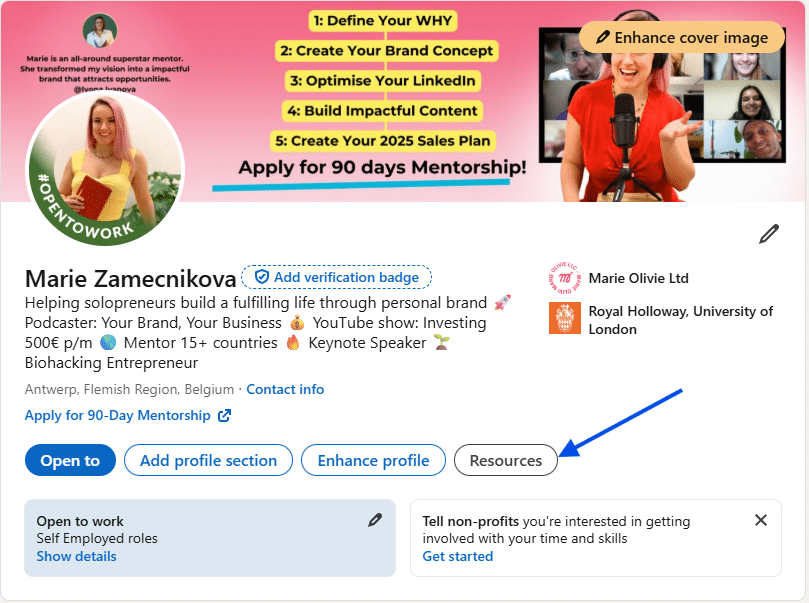
4. Select “Save to PDF.”

That’s it. LinkedIn instantly creates a PDF resume based on your profile and downloads it to your device. This option is ideal when you need something quickly, like sending a resume to a recruiter or attaching it to an online application. However, keep in mind that the formatting is fixed. You can’t customize sections or reorder content before the download. It reflects your public profile, so whatever is visible there will appear in the resume.
Common mistakes to avoid after you download LinkedIn resume
Once you download resume from LinkedIn, don’t send it immediately without reviewing it. Here are a few common issues to fix:
- Bullet points may be long or vague.
- Job descriptions might sound more like a profile summary than a results-focused resume.
- Skills sections can look crowded.
- Contact details may be missing or limited.
Treat the downloaded file as a strong first draft, not the final version.
Should you use your LinkedIn resume as is?
In some cases, yes. For internal referrals, recruiter outreach, or quick screenings, a LinkedIn-generated resume is often enough. Recruiters are already familiar with the format, and they value clarity over flashy design. For competitive roles, though, you’ll want to refine it. Adjust language, highlight measurable achievements, and tailor it to the job description.
Final thoughts
Learning how to download resume from LinkedIn is one of those small skills that pays off repeatedly. Whether you need a resume in five minutes or want a solid starting point for a customized application, LinkedIn already has what you need. Just remember: the power isn’t only in the download LinkedIn resume button. It’s in keeping your profile updated so that whenever opportunity knocks, your resume is ready too.