If you have ever wondered how to repost on LinkedIn without looking lazy or spammy, you are not alone. Many users scroll past great posts every day but hesitate to share them, unsure of the right way to do it. The truth is, reposting can be a powerful tool when it is done with intention. Used correctly, it helps you stay visible, join meaningful conversations, and build a stronger professional presence without creating content from scratch every time.
This article breaks down how to repost content on LinkedIn step by step, explains why it works, and shows you how to do it in a way that actually boosts engagement.
Why reposting helps your LinkedIn presence
Reposting is not about copying others. It is about curating valuable information for your network. When you repost content on LinkedIn that is relevant and insightful, you show that you know how to spot quality ideas and that you stay informed about your industry. Instead of constantly pushing original posts, reposting allows you to share content that has already proven useful. This positions you as an active participant in professional discussions and aligns you with thought leaders in your field. Over time, people begin to see your profile as a place where useful and interesting information appears consistently.

The benefits of sharing valuable insights
Sharing content that resonates with your audience helps build credibility. Whether the post covers industry trends, practical tips, or thoughtful perspectives, reposting allows you to provide value without turning your profile into a self-promotion feed. When you regularly repost content on LinkedIn that is connected to your expertise, your audience starts recognizing you as a reliable source of information. This builds trust and keeps people engaged with what you share, even when the content did not originally come from you.
How reposting increases engagement and visibility
One of the biggest advantages of reposting is that it taps into conversations that already exist. Instead of starting from zero, you are joining a discussion that has momentum. When your connections like, comment on, or share your repost, it becomes visible to their networks as well. This extended reach can put your profile in front of people far beyond your immediate connections. As a result, reposting can increase likes, comments, and overall visibility with much less effort than creating new content from scratch.
Step by step guide on how to repost on LinkedIn
Understanding how to repost on LinkedIn correctly starts with knowing your options. LinkedIn gives you two main ways to share someone else’s post.
Repost vs share with your thoughts
The “Repost” option allows you to share the original post exactly as it is. This is useful when you simply want to pass along content you find valuable without adding commentary.
The “Repost with your thoughts” option lets you include your own message before reposting. This is often the better choice if you want to add context, explain why the post matters, or encourage discussion. Adding even a short comment can make your repost feel more personal and engaging.
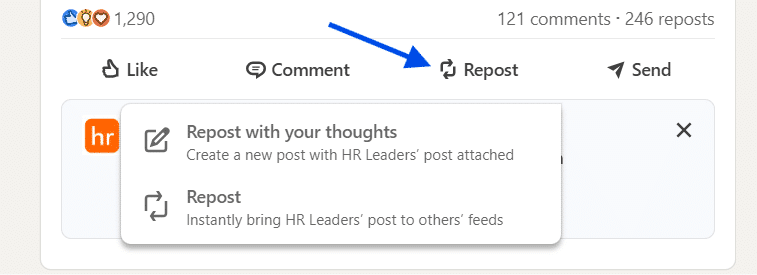
To repost, click the repost button under the post you want to share and choose the option that fits your goal.
When and how to tag original creators
Giving credit is essential when reposting. Tagging the original creator shows respect and avoids the impression of stealing content. When you use “Share with your thoughts,” simply type “@” followed by the creator’s name in your text. This acknowledges their work and can also encourage interaction, as creators are more likely to engage when they are tagged.
Best practices for reposting on LinkedIn
Reposting works best when it is done thoughtfully. A few simple habits can make a big difference in how your reposts are received.
How to add value to reposted content
Try to add something of your own whenever possible. You might explain why the post is relevant, connect it to a current trend, or share a brief personal takeaway. Asking an open-ended question is another effective way to invite discussion, such as asking how others see the topic affecting the industry. These small additions help transform a repost from a simple share into a conversation starter.
Mistakes that reduce engagement
Avoid reposting too often. If your profile is filled only with reposts, it can start to look unoriginal or spammy. Balance reposts with your own thoughts and insights. Also, do not repost content that is irrelevant to your audience. Always consider whether the post fits your industry and provides real value. Relevance is key to keeping engagement high.
Learning how to repost on LinkedIn the right way is less about buttons and more about intention. When you repost thoughtfully, credit creators, and add value, you strengthen your professional brand and stay visible without overwhelming your audience. Reposting is simple, but when done correctly, it can quietly become one of the most effective tools in your LinkedIn strategy.