LinkedIn has become the go-to platform for networking, hiring, and researching potential business connections. But one question keeps coming up again and again: Can you view someone else’s LinkedIn profile anonymously? Many users want to browse discreetly—whether to research competitors, check out job applicants, or simply satisfy their curiosity without alerting the other person. If you’ve ever wondered how private LinkedIn viewing actually works, this article breaks down everything you need to know.
How LinkedIn profile viewing works
When you visit someone’s LinkedIn profile, the platform normally shows your name, headline, and sometimes your workplace in their “Who’s viewed your profile” section. This is part of LinkedIn’s transparent networking approach, which encourages open communication.

However, not everyone wants their browsing habits revealed. Can you check LinkedIn profile anonymously? That’s where LinkedIn’s privacy settings—and the idea of an anonymous LinkedIn profile viewer—come into play.
What LinkedIn shows by default
By default, LinkedIn uses the “your name and headline” visibility option. This means the person you viewed will know exactly who visited their profile. For most users, this is perfectly fine. For others, especially recruiters or researchers, it may feel a bit revealing.
Where anonymity concerns come from
Platforms like Google or Facebook allow more passive browsing. LinkedIn, on the other hand, sees profile views as social signals. People often check who viewed them, especially when job hunting or networking. That’s why so many users ask: Can you view someone else’s LinkedIn profile anonymously? The short answer is: Yes — but with limitations.
How to view someone’s LinkedIn profile anonymously
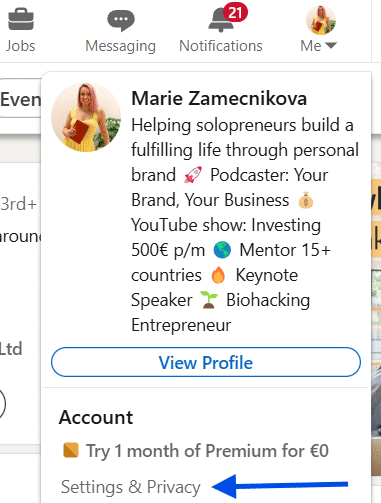
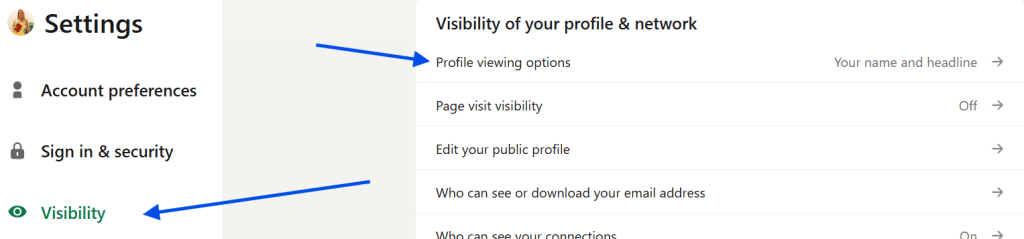
LinkedIn provides a built-in way to browse privately. You don’t need external tools, apps, or questionable websites claiming to act as an “anonymous linkedin profile viewer.” To view profiles anonymously, follow these steps:
- Select your profile picture in the top-right corner to access the menu.
- In the drop-down menu, click on “Settings & Privacy.”
- Open the “Visibility” section.
- Under “Profile viewing options,” select “Private mode.”
When private mode is active, your profile visits appear as:
- “LinkedIn member”
- Or “Someone viewed your profile”
In this mode, your name and information remain hidden, giving you the freedom to browse without triggering any notifications that reveal your identity.
What you sacrifice by using private mode
There’s an important trade-off: When you browse anonymously, you also lose access to the list of who viewed your profile. This is LinkedIn’s “give privacy, lose visibility” rule. If they can’t see you, you can’t see them.
Is it really 100% anonymous?
Yes — LinkedIn won’t reveal your identity
If you’re using LinkedIn’s private mode, your identity is hidden completely. The person whose profile you viewed will never know you were there. LinkedIn does not “undo” anonymity, nor does it reveal hidden views retroactively.
No — third-party tools can’t magically reveal private viewers
Many websites claim they can show hidden visitors or act as a linkedin profile viewer that uncovers identities. These claims are false. LinkedIn does not share this data with external services, and using such tools can compromise your account security.
Why people use anonymous LinkedIn viewing
There are several legitimate reasons someone might want to browse LinkedIn privately.
Researching job candidates
Recruiters often need to review large numbers of candidate profiles. Anonymous viewing prevents candidates from misinterpreting these visits or expecting immediate follow-up.
Checking out competitors
Professionals performing market research or competitor analysis may prefer not to reveal their interest.
Discreet career exploration
Employees exploring new opportunities may want to avoid alerting colleagues, managers, or HR who might see their profile views.
Casual browsing without pressure
Sometimes you just want to satisfy your curiosity without starting a conversation you’re not ready for.
Drawbacks of anonymous viewing
While useful, anonymous browsing isn’t always ideal.
Reduced networking potential
When people can see you’re interested in them, they may reach out and connect. Anonymity removes these opportunities.
Less profile visibility data
As mentioned, anonymous mode hides your own viewer list. If you’re actively building your presence or searching for a job, this can be a disadvantage.
Missed opportunities for engagement
Sometimes a simple profile visit can open doors — hiring managers may reach out, potential partners may connect, or clients may notice your interest. Anonymous viewing eliminates these subtle social signals.
Final verdict: Can you view someone else’s linkedin profile anonymously?
Yes — you absolutely can. LinkedIn’s built-in privacy settings allow you to browse in either fully private or semi-private mode. If your primary concern is discretion, anonymous viewing is completely safe, supported by LinkedIn, and widely used by professionals, researchers, and recruiters.