If you’ve ever scrolled through a LinkedIn profile and noticed a long list of skills with dozens of endorsements, you might have wondered how those endorsements really work. More importantly, you may be asking yourself how to endorse someone on LinkedIn the right way, without it feeling random or meaningless.
Skill endorsements are a simple feature, but they carry more weight than many people realize. They help validate expertise, strengthen professional relationships, and quietly improve how both profiles are perceived. Used well, they’re one of the easiest ways to be active on LinkedIn without posting or writing comments. Here’s everything you need to know, step by step, along with a few smart tips most people overlook.
Why skill endorsements matter more than you think
Endorsing a skill is not just a polite gesture. It’s a public signal that says, “I’ve worked with this person, and I trust their ability.” Recruiters, clients, and hiring managers often scan the skills section quickly. Skills with more endorsements tend to stand out and move higher on the profile. There’s also a social side to it. When you endorse someone, LinkedIn notifies them. That small action can reopen conversations, strengthen connections, or even lead to new opportunities down the line.

Who you can endorse on LinkedIn
You can only endorse skills for your 1st-degree connections. That means you must already be connected with the person. You also can’t create new skills for them. You can only endorse skills that are already listed on their profile. This limitation is actually helpful. It keeps endorsements relevant and prevents spammy or inaccurate skill claims.
How to endorse someone on LinkedIn step by step
If you’re wondering how to endorse someone on LinkedIn without overthinking it, the process is very straightforward.
First, navigate to the profile of your 1st-degree connection. You can do this by searching their name or clicking through your connections list. Next, scroll down until you reach the Skills & endorsements section. This area lists all the skills the person has added to their profile. If they have only a few skills, you’ll see them right away. If they have more than three skills listed, click the “Show more” option at the bottom of the section to view the full list.
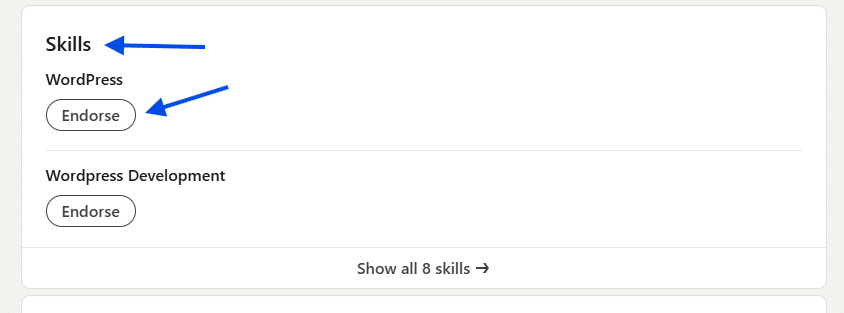
Once you find the skill you want to endorse, look for the Endorse button under the skill name. Click it, and that’s it. The endorsement is instantly applied.
What happens after you endorse a skill
After you endorse someone, your name and profile picture appear next to that skill on their profile. This adds credibility, because viewers can see exactly who is backing that skill. The person you endorsed may also receive an email notification, as long as they’ve opted in to receive those alerts. Over time, the most endorsed skills move to the top of the Skills & endorsements section, making them more visible to profile visitors.
Best practices for endorsing skills
While it’s easy to click the button, thoughtful endorsements are far more effective than mass endorsing every skill you see. Only endorse skills you’ve actually seen in action. If you worked with someone on a project and know they’re great at data analysis, endorse that. If you’ve never seen them code, skip that skill. Spacing out endorsements also helps. Endorsing someone occasionally feels more genuine than endorsing dozens of profiles in one sitting.
Should you expect endorsements in return?
Endorsements aren’t supposed to be transactional, but reciprocity often happens naturally. When you endorse someone sincerely, they may visit your profile and return the favor if it makes sense. That said, don’t chase endorsements just to increase your numbers. A smaller list of well-endorsed, relevant skills looks stronger than a long list filled with weak or unrelated endorsements.
Knowing how to endorse someone on LinkedIn properly is a small skill with a big payoff. It helps others, strengthens your professional network, and keeps your presence active in a subtle, respectful way. A few thoughtful clicks can go a long way. And on a platform built around professional credibility, that kind of attention to detail matters.